CytoFlow.rs Documentation
Welcome to the documentation for CytoFlow.rs, a free, open-source desktop application for analysing flow cytometry data (FCS files) on macOS, Windows and Linux.
What is CytoFlow.rs?
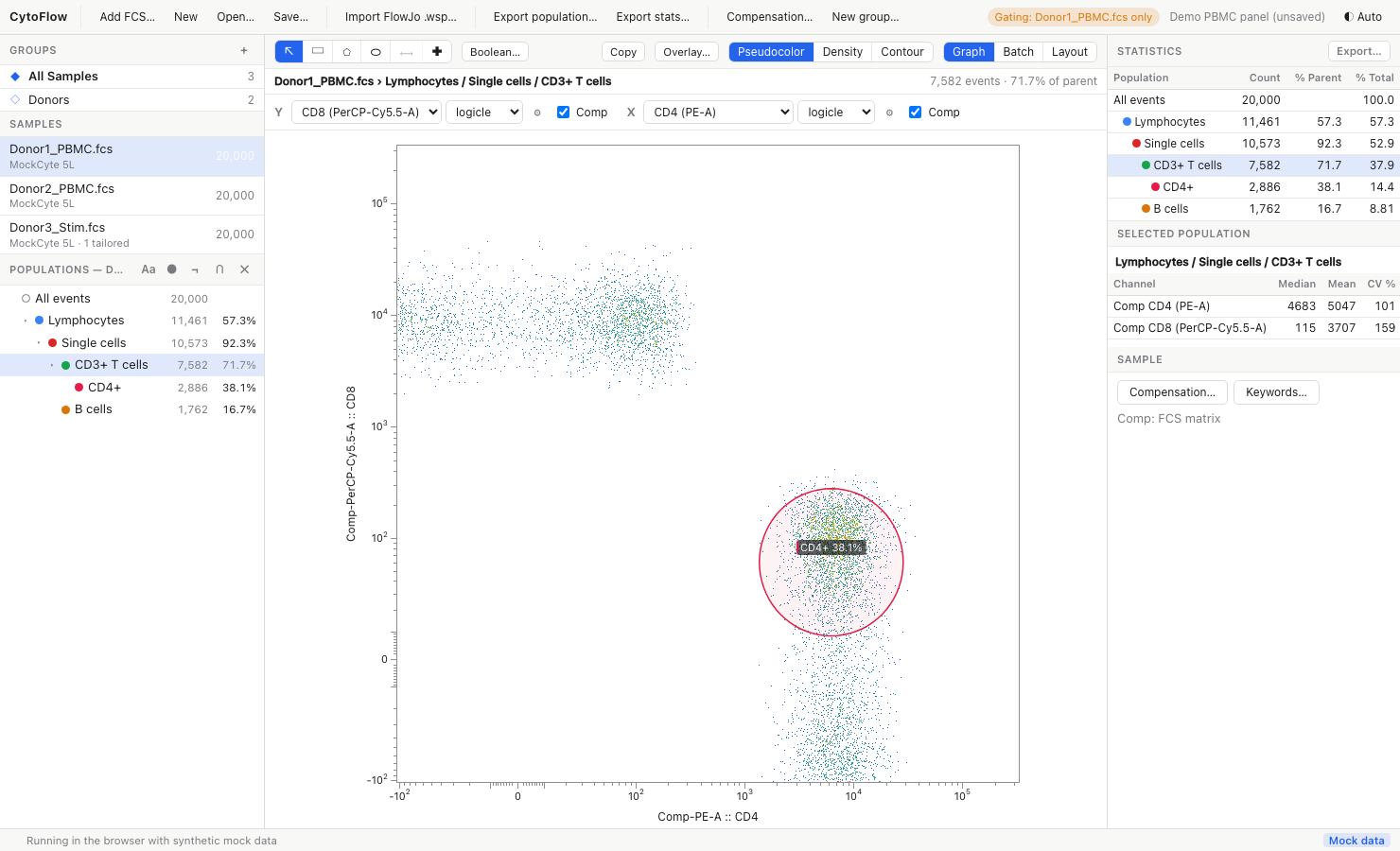
CytoFlow.rs covers the everyday FlowJo-style workflow in one desktop application. With it you can:
- Load FCS 2.0 / 3.0 / 3.1 files, group samples and inspect their keywords
- Compensate with the file's own spillover matrix or a custom one
- Plot any pair of channels on linear, log, arcsinh, logicle or FlowJo-compatible biexponential axes
- Draw a hierarchical gate tree (rectangle, polygon, lasso, ellipse, range, linked quadrants, Boolean gates)
- Read population and per-channel statistics
- Export gated events (CSV, XLSX, Parquet), statistics tables, plots and printable layouts
- Import FlowJo
.wspworkspaces and reproduce their population counts
It is written in Rust (the analysis engine, cytoflow-core) with a Tauri 2 desktop shell and a TypeScript user interface.
Successor of Rodrigolab's Flow Cytometry Analyzer
CytoFlow.rs replaces Rodrigolab's Flow Cytometry Analyzer, which is being deprecated. Everything that tool did (lasso selection, combined filters, log/linear axes, CSV/Excel/Parquet export, themes) is available here, plus a full gating hierarchy, compensation and FlowJo import. See Coming from Flow Cytometry Analyzer.
Quick Links
- Installation Guide - How to install pre-built binaries (including the macOS Gatekeeper and Windows SmartScreen steps)
- User Guide - How to use the application
- Coming from Flow Cytometry Analyzer - Feature mapping and a 5-minute walkthrough for users of the old tool
- Keyboard Shortcuts - Every shortcut on one page
- Building from Source - Compilation instructions and running the tests
- Validation - How the engine is tested and how closely it agrees with FlowJo
- Troubleshooting - Common issues and solutions
Features
- FCS reader: FCS 2.0, 3.0 and 3.1; integer, float and double data; both byte orders;
$PnElog amplification and$PnGgain;$SPILLOVER/SPILL/$COMPmatrices - Axis scales: linear, log, arcsinh, logicle (with automatic width estimation) and FlowJo's biexponential, all with editable parameters. Changing a scale re-maps existing gates so they keep their meaning
- Compensation: the matrix stored in each FCS file, none, or a custom editable matrix
- Gating: rectangle, polygon, freehand lasso, ellipse, range (histograms), linked quadrants and Boolean (AND / OR / NOT) gates in a population hierarchy
- Groups: sample groups carry template gate trees; any gate can be tailored for a single sample and pushed back to a group
- Plots: pseudocolour dot plot, density, contour and histogram, with decade tick marks on log-like axes; zoom and pan; overlays of several populations or samples; a batch grid across samples; copy as PNG
- Statistics: count, % of parent, % of total, and per-channel median, mean, CV, SD and geometric mean
- Export: gated events as CSV, Excel (XLSX, with a metadata sheet) or Parquet; the statistics table as CSV; plots and layout pages as PNG or SVG
- Layout editor: arrange plots and statistics tables on A4 / Letter pages that re-render from live data
- FlowJo import: samples, groups, per-sample transforms, compensation and each sample's gate tree from FlowJo 10
.wspfiles - Themes: Auto (follows the system), Light, Dim and Dark
- Cross-platform: macOS (Apple Silicon and Intel), Windows and Linux
System Requirements
- macOS: 11 (Big Sur) or later, Apple Silicon or Intel
- Windows: Windows 10 or later (x64)
- Linux: Ubuntu 22.04+, Debian 11+ (x86_64)
Memory use grows with the number of events loaded: plan for roughly 4 bytes per event per channel for every open sample (a 1-million-event, 20-channel file needs about 80 MB).
Getting Started
- Download and install the application for your platform
- macOS users: If you see an "app is damaged" error, see the Installation Guide for instructions on bypassing macOS Gatekeeper
- Windows users: If SmartScreen shows a warning, see the Installation Guide for instructions on bypassing the warning
- Learn the basics of using the application
- Start analysing your FCS files!
Clean-Room Implementation
CytoFlow.rs is a clean-room implementation. It is built only from public specifications and papers:
- the ISAC Flow Cytometry Standard (FCS 3.1),
- the ISAC Gating-ML 2.0 standard,
- the logicle scale of Parks, Roederer & Moore, Cytometry A 69A:541 (2006),
- the openly documented FlowJo
.wspXML layout (and the public FlowKit / CytoML descriptions of it).
It contains no code or assets derived from any commercial product, and it is validated against public ground-truth fixtures (see Validation). FlowJo is a trademark of its respective owner; CytoFlow.rs is not affiliated with it.
License
This project is licensed under the MIT License. Test fixtures under testdata/ come from FlowKit (BSD-3-Clause).
Support
For issues, feature requests, or questions, please visit the GitHub repository and open an issue.